Use the Circle of Fifths for related guitar keys
Move through major keys and relative minors while keeping a practical chord-and-guitar context.
Access: Free
Open Circle of Fifths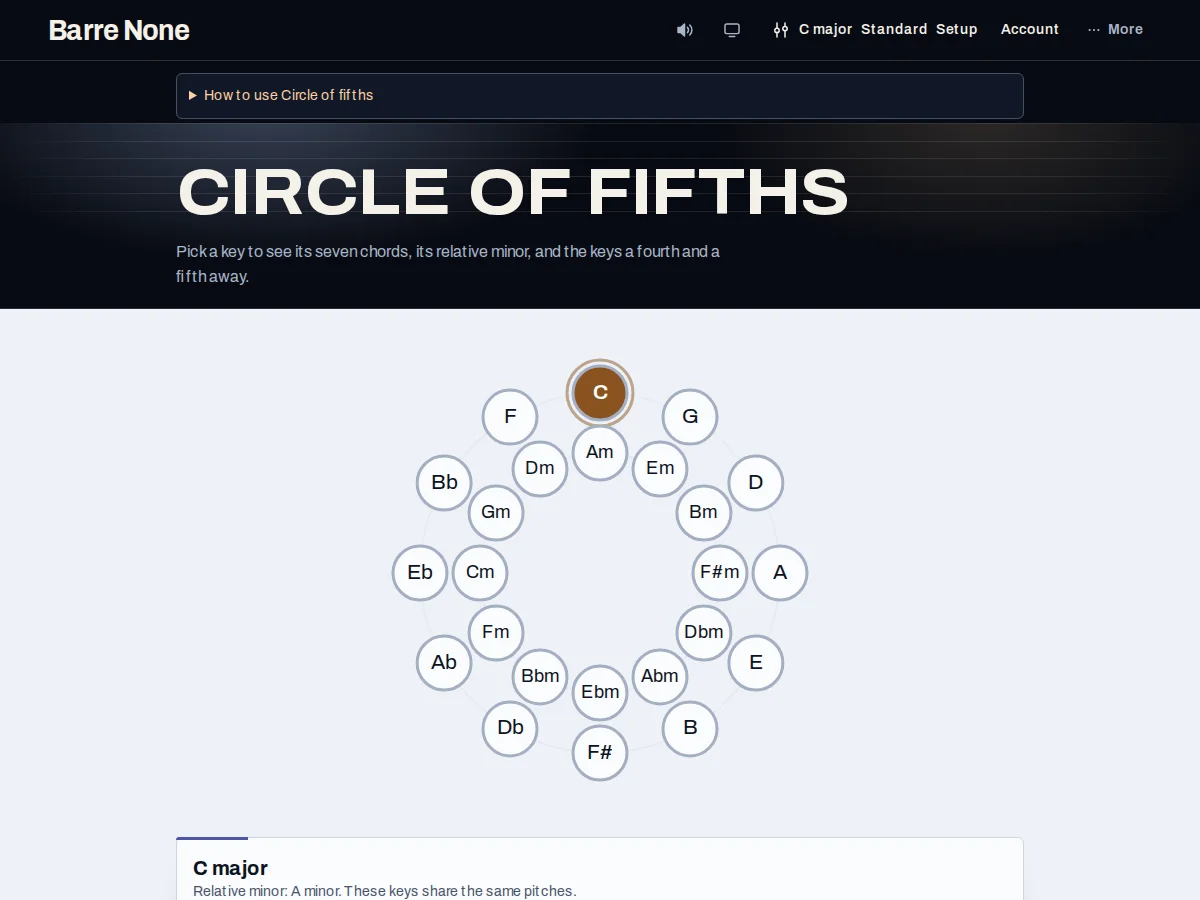
Get started
- Open Circle of Fifths from the current key or the More menu.
- Select an outer major-key segment or an inner relative-minor segment.
- Use the displayed fourth and fifth relationships to choose a neighboring key.
- Review the seven chords for the selected key.
- Open the selected key in Key explorer when you want voicings, progression editing, or playback.
How it works
Read the two rings
The outer ring contains 12 major keys in fifths order. The inner ring contains each major key’s relative minor. Each segment is an accessible button named with its tonic, mode, and relationship. The selected key is highlighted, and its fourth and fifth neighbors receive emphasis.
- The circle is a navigation aid, not a claim that only neighboring keys are musically valid.
- Minor mode uses the app’s relative-minor spelling and carries the selected musical state forward.
Keep your guitar context
Selecting a key updates the musical state while preserving unrelated setup such as tuning, capo, progression, and tempo. The circle link from Key explorer carries your current state, so exploring keys does not silently discard your work.
- Modes outside major, minor, and aeolian are not positioned as circle segments.
- Open in Key explorer to see diagrams and the current chord form.
Use the relationships
A move clockwise is a fifth upward; a move counterclockwise is a fourth upward. The relative-minor pair shares the same key signature in conventional theory, while the app still renders each mode’s own chord symbols and functions.
Move from C major toward a minor color
- Select C major on the outer ring.
- Choose A minor in the inner ring as its relative minor.
- Open A minor in Key explorer and inspect its i, iv, and v chords.
- Use the circle’s neighboring segments if you want a fourth- or fifth-related destination.
What to expect: You arrive at A minor with its own chord grid while keeping the app’s tuning, capo, and other shared musical settings.
Troubleshooting
Why is my modal key not highlighted on the circle?
The circle presents major keys and relative minors. Dorian, mixolydian, and the other modes remain available through Key explorer’s mode picker.
Why did my setup remain when I changed keys?
That is intentional. The circle changes tonic and mode while preserving tuning, capo, progression, tempo, and other state.
Why can’t I edit a progression here?
Circle of Fifths is navigation. Open the selected key in Key explorer for the progression builder and playback controls.